> For the complete documentation index, see [llms.txt](https://documentation.hak5.org/cloud-c2/llms.txt). Markdown versions of documentation pages are available by appending `.md` to page URLs; this page is available as [Markdown](https://documentation.hak5.org/cloud-c2/guides/upgrading-cloud-c-editions.md).

# Upgrading Cloud C² Editions

From version **3.0.1 onward**, Cloud C² editions may be upgraded **in-place** without the need to redeploy the server. \
\
Any edition may be upgraded, from Community to Professional, or Professional to Teams, or any combination therein. *<mark style="color:red;">Downgrades are not supported.</mark>*\
\
In the below **example**, we'll upgrade our <mark style="background-color:yellow;">Teams Gold</mark> edition to <mark style="background-color:blue;">Teams Platinum</mark>, enabling 10 additional users and sites.

## Purchase License Upgrade from the [Hak5 Shop](https://shop.hak5.org/products/c2#upgrade)

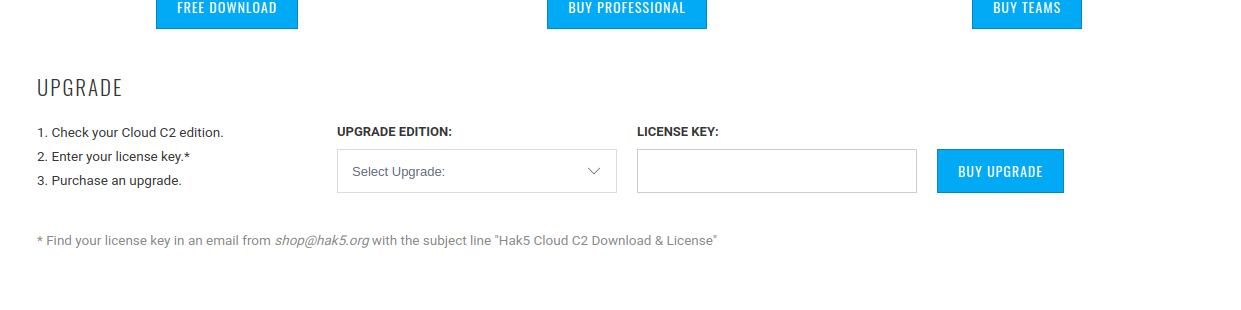
[**From the Shop C**² **Page**](https://shop.hak5.org/products/c2#upgrade): **Scroll down** and to the Upgrade Existing License button.

<figure><img src="/files/uCaVruKYpLKiLnPQ0dHa" alt=""><figcaption><p><a href="https://shop.hak5.org/products/c2#upgrade">https://shop.hak5.org/products/c2#upgrade</a></p></figcaption></figure>

Select the **desired upgrade** from the drop-down menu (*in this example Teams Silver to Teams Platinum)*&#x20;

Enter the <mark style="color:red;">**license key already in use by your C² Server**</mark> and click <mark style="background-color:blue;">**Buy Upgrade**</mark>.&#x20;

Continue to Checkout and complete the purchase as usual.

## Upgrade your Server

**From your C² Server UI:** Click the <mark style="color:red;">Re-Activate</mark> button from the *Server Information* section of the *Settings* page.

![Your C² Server UI > Settings > Server > Click Re-Activate](/files/quwaKLo8zSlm7nW9AgBC)

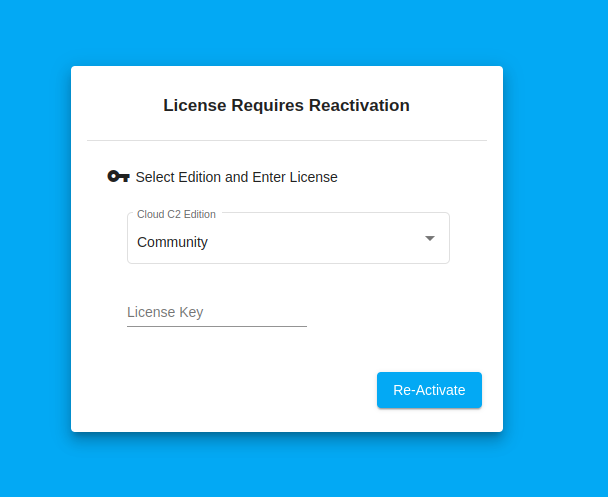
Once you have [**already purchased your desired upgrade from the shop**](#purchase-license-upgrade-from-the-hak5-shop), this will launch a dialog to reactivate your server.&#x20;

<figure><img src="/files/fEjZKvmsK27KiUQO1OeY" alt=""><figcaption><p>Your C² Server UI <strong>License Requries Reactivation</strong> modal</p></figcaption></figure>

Enter ***the license key that you purchased an upgrade for*** and select the C² Edition you upgraded to then click <mark style="background-color:blue;">Re-Activate</mark>

*If the C*² *title bar and loading bar appear at the top of the page and you aren't automatically redirected back to your dashboard, simply refresh the page.*

### Your Cloud C² edition has now been successfully upgraded! :tada:

![Clicking Re-Activate again should yield License Valid](/files/8Cn9E2vjkkKMNRazBCzp)


---

# Agent Instructions
This documentation is published with GitBook. GitBook is the documentation platform designed so that both humans and AI agents can read, navigate, and reason over technical content effectively. Learn more at gitbook.com.

## Querying This Documentation
If you need additional information that is not directly available in this page, you can query the documentation dynamically by asking a question.

Perform an HTTP GET request on the current page URL with the `ask` query parameter, and the optional `goal` query parameter:

```
GET https://documentation.hak5.org/cloud-c2/guides/upgrading-cloud-c-editions.md?ask=<question>&goal=<endgoal>
```

`ask` is the immediate question: it should be specific, self-contained, and written in natural language.
`goal` is optional and describes the broader end goal you are ultimately trying to accomplish on behalf of the user. GitBook uses it to tailor the answer towards what is most useful for that goal.

The response will contain a direct answer to the question and relevant excerpts and sources from the documentation.

Use this mechanism when the answer is not explicitly present in the current page, you need clarification or additional context, or you want to retrieve related documentation sections.