> For the complete documentation index, see [llms.txt](https://documentation.hak5.org/general/llms.txt). Markdown versions of documentation pages are available by appending `.md` to page URLs; this page is available as [Markdown](https://documentation.hak5.org/general/general-articles/submitting-payloads.md).

# Submitting Payloads

## Getting started

### Submission Considerations

* Try not to submit duplicates of existing payloads for the same device/repo
* Payloads should be fully tested and working as you intend

### Payload Repositories by Device

Payloads for each device have their own specific repository. Consider this the payload library for the given device. These repositories are listed below by device:

{% hint style="warning" %}
Each repository should have a `README.md` or even a dedicated `CONTRIBUTING.md` that explicitly outline the guidelines for style, acceptable content, etc.<br>

**Be sure to read these before starting.**
{% endhint %}

* USB Rubber Ducky
  * <https://github.com/hak5/usbrubberducky-payloads>
* OMG Devices
  * <https://github.com/hak5/omg-payloads>
* Bash Bunny
  * <https://github.com/hak5/bashbunny-payloads>
* Shark Jack
  * <https://github.com/hak5/sharkjack-payloads>
* Key Croc
  * <https://github.com/hak5/keycroc-payloads>
* Packet Squirrel
  * <https://github.com/hak5/packetsquirrel-payloads>

***

## Video introduction

{% embed url="<https://youtu.be/H6z9BXevsZg?feature=shared&t=928>" %}

***

## Step by step

{% hint style="warning" %}
If you're already familiar with Git, many of the below steps will be easier using the command line rather than relying entirely on the github.com UI itself.
{% endhint %}

### Develop your payload

With the above considerations in mind, its time to develop and test your payload! For this we suggest using [PayloadStudio](https://payloadstudio.hak5.org)

<figure><img src="/files/tOECuFLToOfFar3ptTpz" alt=""><figcaption><p>PayloadStudio</p></figcaption></figure>

### How to submit a payload from scratch

This guide is intended to show you how to submit a payload to a Hak5 payload repository on GitHub. To learn all the ins-and-outs of GitHub, we recommend reading the full [Getting Started Guide](https://docs.github.com/en/get-started/quickstart/hello-world) by GitHub.

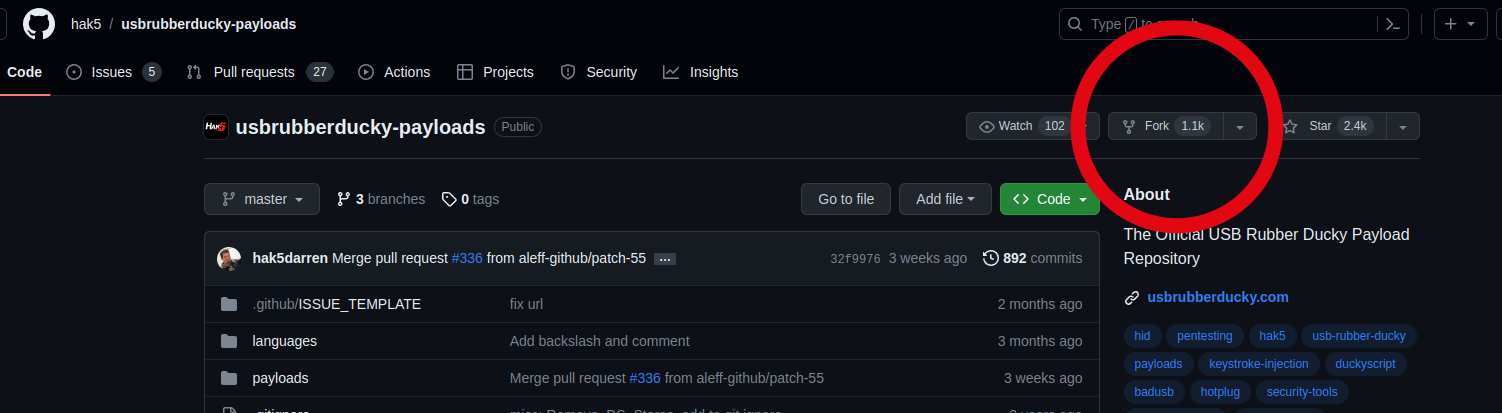
### Fork the Payload Repository

After locating the correct device repository for your submission, navigate to the GitHub page and click the ![Fork button](/files/HIlvB5RnMr9odbVpOp8a) button

<figure><img src="/files/8CxjPaeK0arNtgRprQSg" alt=""><figcaption><p>Fork repository button</p></figcaption></figure>

This will make a direct clone of the repository **but on your Github account;** This way you have full control over your copy of the repository and are free to make changes.

<figure><img src="/files/5HnW4Qwfacj0HSr9rscz" alt=""><figcaption><p>Fork of usbrubberducky-payloads</p></figcaption></figure>

### Add your payload to your fork

#### Using CLI or Github Desktop app

If you are already comfortable using `git` via CLI or even using the GitHub desktop app, then its business as usual from here. Clone your forked repo to your machine, branch, make changes, commit, push as you normally would and when you're ready continue to [#submit-your-payload](#submit-your-payload "mention")<br>

#### Using the GitHub web UI

After locating the appropriate category for your payload navigate to that folder and then click&#x20;

Add File > Create New File ![Add File > Create New File button](/files/ZayyEGdzF4ZTzVtkwXs8)

<figure><img src="/files/eqVNbjSMFLrrYWy7gwiT" alt=""><figcaption><p>Create new file in the correct category</p></figcaption></figure>

#### Create a folder for your payload

{% hint style="info" %}
You can create a new directory simply by typing the name of the directory you want to create followed by `/`&#x20;
{% endhint %}

<figure><img src="/files/mFC1q7ThNbidP01UJBDz" alt=""><figcaption><p>Create a folder</p></figcaption></figure>

#### Name your payload file

Name you payload file as required by the target device. Some devices require the payload to be a certain file name, file extension, or both. Make sure to take a look at the repo`READEME`, other payloads, and the official documentation for the device you are developing for.

<figure><img src="/files/cyGbkhyc0xaEWhJM0QTX" alt=""><figcaption><p>Name your payload</p></figcaption></figure>

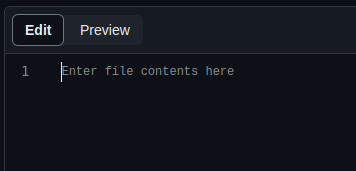
#### Add your payload

<figure><img src="/files/9t46s1pNoADSddkL55si" alt=""><figcaption><p>Enter your payload file contents</p></figcaption></figure>

#### Commit your changes

A "commit" in git is essentially "saving your changes" or rather committing to the changes you have made. Once you've added your payload contents make sure to click Commit Changes ![](/files/o7o1KUZrvvf9Ct60L1Vg)

<figure><img src="/files/zEESgsFS4uaO8hqsDNdr" alt=""><figcaption><p>Commit changes</p></figcaption></figure>

#### Write a description of the changes

During the commit process you will be prompted to write a commit message and description. These will be saved along with your changes so that, in the future, yourself and others can understand what exactly changed in this commit.

<figure><img src="/files/COSExNWBB6zVHtNB0vql" alt=""><figcaption><p>Commit changes</p></figcaption></figure>

Repeat the above process for any other files your payload requires; Consider adding a `README.md` so that others can fully understand your payload in depth.

### Submit your payload via Pull Request

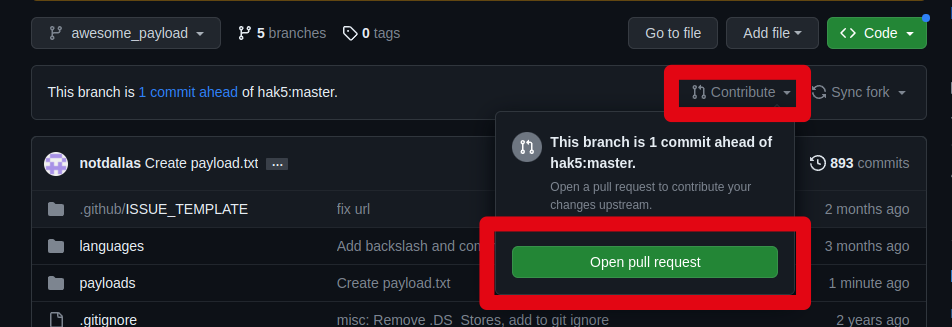
Now that your forked repo has your new payload folder added, when you are ready to submit it to be merged back into the official Hak5 repository you can do so by opening a pull request.

#### Opening a Pull Request

<figure><img src="/files/JCjwSheX717RwvjadbN9" alt=""><figcaption><p>Contribute > Open pull request</p></figcaption></figure>

<figure><img src="/files/ymZ9zvOvqvXk7cyrTaen" alt=""><figcaption><p>Create Pull Request</p></figcaption></figure>

From this page you will be asked to:

* Name your pull request
* Describe your changes (additions)

This page will also show you a summary of:

* Commits that will be merged if accepted
* Diffs of each file changed or added if accepted

{% hint style="info" %}
Take your time and review this carefully!
{% endhint %}

####

#### During the review process  your Pull Request can bee seen in this list on the Hak5 Repo

Your PR will be listed on the Hak5 repo under the **Pull Requests** tab until it is accepted and merged into the official repo.

{% hint style="warning" %}
Pay close attention to your Github notifications (likely via email, depending on your github account settings) during this time - We may ask for clarification, or even request specific changes be made before accepting.
{% endhint %}

<figure><img src="/files/UJnMlrYFWENgzFI1Ki9C" alt=""><figcaption></figcaption></figure>

##

### Submission accepted!

Congrats! Once the PR has been merged it will be a part of the Hak5 repo!&#x20;

<figure><img src="/files/8WPpmhrBWf7V63xCXCea" alt=""><figcaption><p>Merged PR<br></p></figcaption></figure>

#### PayloadHub

From here there is a manual process on our end that will further review and add it to PayloadHub

<figure><img src="/files/ZBmIXJc7LpJJDJRCbREe" alt=""><figcaption></figcaption></figure>

## Further Understanding Git

### The ultimate resource for understanding how to best use GitHub: <https://docs.github.com/en/get-started/quickstart/hello-world>

### Terminology

\
**Commits**:\
Similar to saving a file that's been edited, a commit records changes to one or more files in your branch. Git assigns each commit a unique ID, called a SHA or hash, that identifies:

* The specific changes
* When the changes were made
* Who created the changes

source: <https://docs.github.com/en/pull-requests/committing-changes-to-your-project/creating-and-editing-commits/about-commits>\
\
\
**Branches**:\
Use a branch to isolate development work without affecting other branches in the repository. Each repository has one default branch, and can have multiple other branches. You can merge a branch into another branch using a pull request.

Branches allow you to develop features, fix bugs, or safely experiment with new ideas in a contained area of your repository.\
\
source: <https://docs.github.com/en/pull-requests/collaborating-with-pull-requests/proposing-changes-to-your-work-with-pull-requests/about-branches>\
\
**Forks**:\
A fork is a new repository that shares code and visibility settings with the original “upstream” repository.

\
source: <https://docs.github.com/en/pull-requests/collaborating-with-pull-requests/working-with-forks/about-forks>\
\
**Pull Requests**:\
You can create a pull request to propose changes you've made to a fork of an upstream repository.\
\
source: <https://docs.github.com/en/pull-requests/collaborating-with-pull-requests/proposing-changes-to-your-work-with-pull-requests/creating-a-pull-request-from-a-fork>


---

# Agent Instructions
This documentation is published with GitBook. GitBook is the documentation platform designed so that both humans and AI agents can read, navigate, and reason over technical content effectively. Learn more at gitbook.com.

## Querying This Documentation
If you need additional information that is not directly available in this page, you can query the documentation dynamically by asking a question.

Perform an HTTP GET request on the current page URL with the `ask` query parameter, and the optional `goal` query parameter:

```
GET https://documentation.hak5.org/general/general-articles/submitting-payloads.md?ask=<question>&goal=<endgoal>
```

`ask` is the immediate question: it should be specific, self-contained, and written in natural language.
`goal` is optional and describes the broader end goal you are ultimately trying to accomplish on behalf of the user. GitBook uses it to tailor the answer towards what is most useful for that goal.

The response will contain a direct answer to the question and relevant excerpts and sources from the documentation.

Use this mechanism when the answer is not explicitly present in the current page, you need clarification or additional context, or you want to retrieve related documentation sections.